What is a Switch Statement?
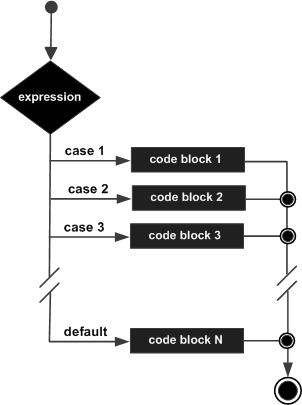
A switch statement tests the value of a variable and compares it with multiple cases. Once the case match is found, a block of statements associated with that particular case is executed.
Each case in a block of a switch has a different name/number which is referred to as an identifier. The value provided by the user is compared with all the cases inside the switch block until the match is found.
Syntax
A general syntax of how switch-case is implemented in a ‘C’ program :
switch (variable or expression)
{
case constant:
     //C Statements      ;
case constant:
      //C Statements      ;      default:
      //C Statements      ;
 }
- The expression can be integer expression or a character expression.
- Case labels (i.e. case constants) are used to identify each case individually. Remember that case labels should not be same as it may create a problem while executing a program. => Suppose we have two cases with the same label as ‘1’. Then while executing the program, the case that appears first will be executed even though you want the program to execute a second case. This creates problems in the program and does not provide the desired output.
- Case labels always end with a colon “:”. Each of these cases is associated with a block.
- A block is nothing but multiple statements which are grouped for a particular case.
- Whenever the switch is executed, the value of test-expression is compared with all the cases which we have defined inside the switch. =>Suppose the test expression contains value 4. This value is compared with all the cases until case whose label four is found in the program. As soon as a case is found the block of statements associated with that particular case is executed and control goes out of the switch.
- The default case is an optional one. Whenever the value of test-expression is not matched with any of the cases inside the switch, then the default will be executed.
Why to use break in switch :
- The break keyword in each case indicates the end of a particular case. If we do not put the break in each case then even though the specific case is executed, the switch will continue to execute all the cases until the end is reached. This should not happen; hence we always have to put break keyword in each case. Break will terminate the case once it is executed and the control will fall out of the switch.
Flow Diagram
Example 1 :
#include<stdio.h>
    int main() {
        int num =2;
        switch (num) {
            case 1:
                printf("Value is 1");
                break;
            case 2:
                printf("Value is 2");
                break;
            case 3:
                printf("Value is 3");
                break;
            default:
                printf("Out of range");
                break;
        }
        return 0;
    }
Output:
Value is 2
- In the given program we have initialized a variable num with value 2.
- A switch construct is used to compare the value stored in variable num and execute the block of statements associated with the matched case.
- In this program, since the value stored in variable num is two, a switch will execute the case whose case-label is 2. After executing the case, the control will fall out of the switch and program will be terminated with the successful result by printing the value on the output screen.
Example 2 :
#include<stdio.h>
int main() {
int language =6;
  switch (language) {
  case 1:
    printf("C#\n");
    break;
  case 2:
    printf("C\n");
    break;
  case 3:
    printf("C++\n");
    break;
  default:
    printf("Other programming language\n");
      }
    }
Output:
Other programming language
The optional default case runs when no other matches are made.
Rules for switch statement:
- An expression must always execute to a result.
- Case labels must be constants and unique.
- Case labels must end with a colon ( : ).
- A break keyword must be present in each case.
- There can be only one default label.
 Shwetasvibhute