Be yourself; Everyone else is already taken.
— Oscar Wilde.
This is the first post on my new blog. I’m just getting this new blog going, so stay tuned for more. Subscribe below to get notified when I post new updates.
C program
Be yourself; Everyone else is already taken.
— Oscar Wilde.
This is the first post on my new blog. I’m just getting this new blog going, so stay tuned for more. Subscribe below to get notified when I post new updates.
Functions are called by their names. If the function does not have any arguments, then to call a function you can directly use its name. But for functions with arguments, we can call a function in two different ways, and these two ways are:
Calling a function by value means, we pass the values of the arguments which are stored or copied into the formal parameters of the function. Hence, the original values are unchanged only the parameters inside the function changes.
#include<stdio.h>

void calc(int x);

int main()
{
    int x = 10;
    calc(x);
    // this will print the value of 'x'
    printf("\nvalue of x in main is %d", x);
    return 0;
}

void calc(int x)
{
    // changing the value of 'x'
    x = x + 10 ;
    printf("value of x in calc function is %d ", x);
}
Output: value of x in calc function is 20 value of x in main is 10
In this case, the actual variable x is not changed. This is because we are passing the argument by value, hence a copy of x is passed to the function, which is updated during function execution, and that copied value in the function is destroyed when the function ends(goes out of scope). So the variable x inside the main() function is never changed and hence, still holds a value of 10
But we can change this program to let the function modify the original x variable, by making the function calc() return a value, and storing that value in x.
#include<stdio.h>

int calc(int x);

int main()
{
    int x = 10;
    x = calc(x);
    printf("value of x is %d", x);
    return 0;
}

int calc(int x)
{
    x = x + 10 ;
    return x;
}
Output: value of x is 20
In call by reference we pass the address (reference) of a variable as argument to any function. When we pass the address of any variable as argument, then the function will have access to our variable, as it now knows where it is stored and hence can easily update its value.
In this case the formal parameter can be taken as a reference or a pointer, in both the cases they will change the values of the original variable.
#include<stdio.h>

void calc(int *p);      // functin taking pointer as argument

int main()
{
    int x = 10;
    calc(&x);       // passing address of 'x' as argument
    printf("value of x is %d", x);
    return(0);
}

void calc(int *p)       //receiving the address in a reference pointer variable
{
    /* changing the value directly that is stored at the address passed */
    *p = *p + 10;
}
Output: value of x is 20
In this tutorial, we will learn about the different types of user defined functions in C and the concept of Nesting of functions which is used in recursion.
There can be 4 different types of user-defined functions, they are:
Below, we will discuss about all these types, along with program examples.
Such functions can either be used to display information or they are completely dependent on user inputs.
Below is an example of a function, which takes 2 numbers as input from user, and display which is the greater number.
#include<stdio.h>

void greatNum();       // function declaration

int main()
{
    greatNum();        // function call
    return 0;
}

void greatNum()     //function definition
{
    int i, j;
     printf("Enter 2 numbers that you want to compare...");
    scanf("%d%d", &i, &j);
    if(i > j) {
        printf("The greater number is: %d", i);
    }
    else {
        printf("The greater number is: %d", j);
    }
}
We have modified the above example to make the function greatNum() return the number which is greater amongst the 2 input numbers.
#include<stdio.h>

int greatNum();       // function declaration

int main()
{
    int result;
    result = greatNum();        // function call
    printf("The greater number is: %d", result);
    return 0;
}

int greatNum()        // function definition
{
    int i, j, greaterNum;
    printf("Enter 2 numbers that you want to compare...");
    scanf("%d%d", &i, &j);
    if(i > j) {
        greaterNum = i;
    }
    else {
        greaterNum = j;
    }
    // returning the result
    return greaterNum;
}
We are using the same function as example again and again, to demonstrate that to solve a problem there can be many different ways.
This time, we have modified the above example to make the function greatNum() take two int values as arguments, but it will not be returning anything.
#include<stdio.h>

void greatNum(int a, int b);       // function declaration

int main()
{
    int i, j;
    printf("Enter 2 numbers that you want to compare...");
    scanf("%d%d", &i, &j);
    greatNum(i, j);        // function call
    return 0;
}

void greatNum(int x, int y)        // function definition
{
    if(x > y) {
        printf("The greater number is: %d", x);
    }
    else {
        printf("The greater number is: %d", y);
    }
}
This is the best type, as this makes the function completely independent of inputs and outputs, and only the logic is defined inside the function body.
#include<stdio.h>

int greatNum(int a, int b);       // function declaration

int main()
{
    int i, j, result;
    printf("Enter 2 numbers that you want to compare...");
    scanf("%d%d", &i, &j);
    result = greatNum(i, j); // function call
    printf("The greater number is: %d", result);
    return 0;
}

int greatNum(int x, int y)        // function definition
{
    if(x > y) {
        return x;
    }
    else {
        return y;
    }
}
C language also allows nesting of functions i.e to use/call one function inside another function’s body. We must be careful while using nested functions, because it may lead to infinite nesting.
function1()
{
    // function1 body here

    function2();

    // function1 body here
}
If function2() also has a call for function1() inside it, then in that case, it will lead to an infinite nesting. They will keep calling each other and the program will never terminate.
Not able to understand? Lets consider that inside the main() function, function1() is called and its execution starts, then inside function1(), we have a call for function2(), so the control of program will go to the function2(). But as function2() also has a call to function1() in its body, it will call function1(), which will again call function2(), and this will go on for infinite times, until you forcefully exit from program execution.
Recursion is a special way of nesting functions, where a function calls itself inside it. We must have certain conditions in the function to break out of the recursion, otherwise recursion will occur infinite times.
function1()
{
    // function1 body
    function1();
    // function1 body
}
#include<stdio.h>

int factorial(int x);       //declaring the function

void main()
{
    int a, b;

    printf("Enter a number...");
    scanf("%d", &a);
    b = factorial(a);       //calling the function named factorial
    printf("%d", b);
}

int factorial(int x) //defining the function
{
    int r = 1;
    if(x == 1)
        return 1;
    else
        r = x*factorial(x-1);       //recursion, since the function calls itself

    return r;
}
A function is a block of code that performs a particular task.
There are many situations where we might need to write same line of code for more than once in a program. This may lead to unnecessary repetition of code. So, C language provides an approach in which you can declare and define a group of statements once in the form of a function and it can be called and used whenever required.
These functions defined by the user are also know as User-defined Functions
C functions can be classified into two categories,
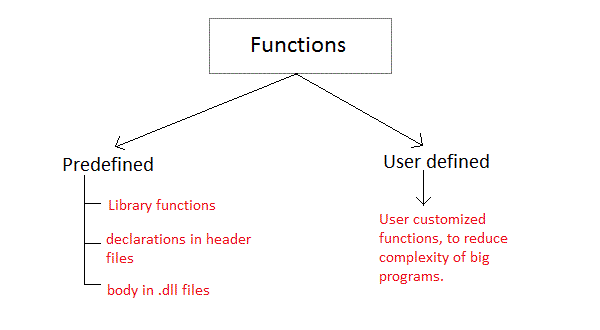
Library functions are those functions which are already defined in C library, example printf(), scanf(), strcat() etc. You just need to include appropriate header files to use these functions. These are already declared and defined in C libraries.
A User-defined functions on the other hand, are those functions which are defined by the user at the time of writing program. These functions are made for code reusability and for saving time and space.
General syntax for function declaration is,
returntype functionName(type1 parameter1, type2 parameter2,...);
Like any variable or an array, a function must also be declared before its used. Function declaration informs the compiler about the function name, parameters is accept, and its return type. The actual body of the function can be defined separately. It’s also called as Function Prototyping. Function declaration consists of 4 parts.
When a function is declared to perform some sort of calculation or any operation and is expected to provide with some result at the end, in such cases, a return statement is added at the end of function body. Return type specifies the type of value(int, float, char, double) that function is expected to return to the program which called the function.
Note: In case your function doesn’t return any value, the return type would be void.
Function name is an identifier and it specifies the name of the function. The function name is any valid C identifier and therefore must follow the same naming rules like other variables in C language.
The parameter list declares the type and number of arguments that the function expects when it is called. Also, the parameters in the parameter list receives the argument values when the function is called. They are often referred as formal parameters.
Let’s write a simple program with a main()function, and a user defined function to multiply two numbers, which will be called from the main() function.
#include<stdio.h>

int multiply(int a, int b);     // function declaration

int main()
{
    int i, j, result;
    printf("Please enter 2 numbers you want to multiply...");
    scanf("%d%d", &i, &j);

    result = multiply(i, j);        // function call
    printf("The result of muliplication is: %d", result);

    return 0;
}

int multiply(int a, int b)
{
    return (a*b);       // function defintion, this can be done in one line
}
Just like in the example above, the general syntax of function definition is,
returntype functionName(type1 parameter1, type2 parameter2,...)
{
    // function body goes here
}
The first line returntype functionName(type1 parameter1, type2 parameter2,…) is known as function header and the statement(s) within curly braces is called function body.
Note: While defining a function, there is no semicolon(;) after the parenthesis in the function header, unlike while declaring the function or calling the function.
The function body contains the declarations and the statements(algorithm) necessary for performing the required task. The body is enclosed within curly braces { ... } and consists of three parts.
void, then no return statement is required).When a function is called, control of the program gets transferred to the function.
functionName(argument1, argument2,...);
In the example above, the statement multiply(i, j); inside the main() function is function call.
Arguments are the values specified during the function call, for which the formal parameters are declared while defining the function.
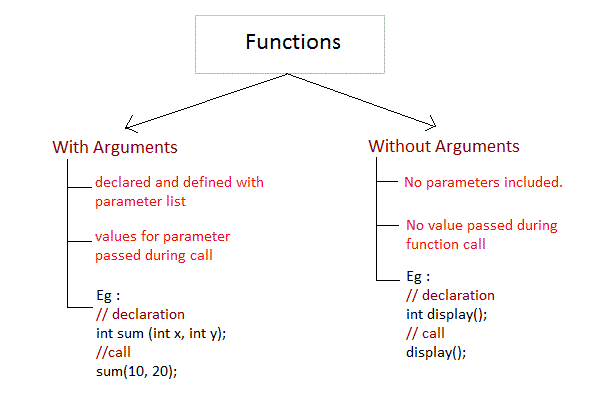
It is possible to have a function with parameters but no return type. It is not necessary, that if a function accepts parameter(s), it must return a result too.
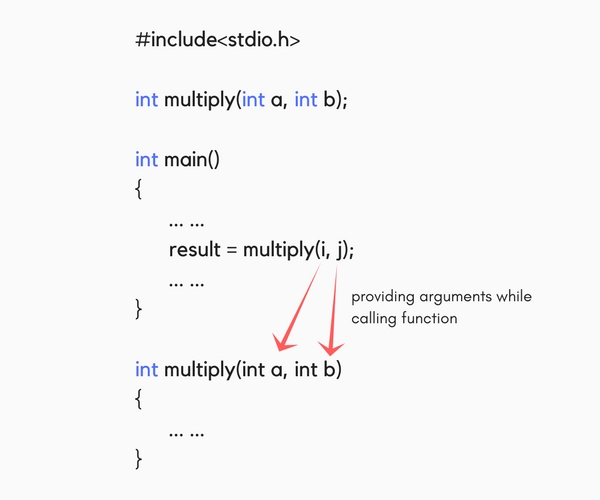
While declaring the function, we have declared two parameters a and b of type int. Therefore, while calling that function, we need to pass two arguments, else we will get compilation error. And the two arguments passed should be received in the function definition, which means that the function header in the function definition should have the two parameters to hold the argument values. These received arguments are also known as formal parameters. The name of the variables while declaring, calling and defining a function can be different.
A function may or may not return a result. But if it does, we must use the return statement to output the result. return statement also ends the function execution, hence it must be the last statement of any function. If you write any statement after the return statement, it won’t be executed.
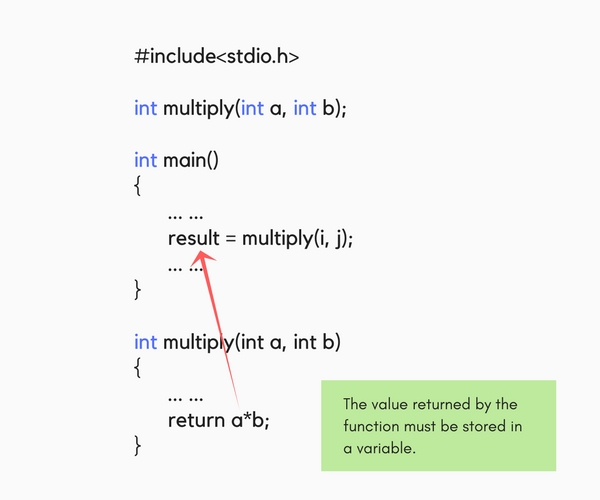
The datatype of the value returned using the return statement should be same as the return type mentioned at function declaration and definition. If any of it mismatches, you will get compilation error.
In C language, each variable has a storage class which decides the following things:
The following storage classes are most oftenly used in C programming,
autoScope: Variable defined with auto storage class are local to the function block inside which they are defined.
Default Initial Value: Any random value i.e garbage value.
Lifetime: Till the end of the function/method block where the variable is defined.
A variable declared inside a function without any storage class specification, is by default an automatic variable. They are created when a function is called and are destroyed automatically when the function’s execution is completed. Automatic variables can also be called local variables because they are local to a function. By default they are assigned garbage value by the compiler.
#include<stdio.h>

void main()
{
    int detail;
    // or
    auto int details;    //Both are same
}
Scope: Global i.e everywhere in the program. These variables are not bound by any function, they are available everywhere.
Default initial value: 0(zero).
Lifetime: Till the program doesn’t finish its execution, you can access global variables.
A variable that is declared outside any function is a Global Variable. Global variables remain available throughout the program execution. By default, initial value of the Global variable is 0(zero). One important thing to remember about global variable is that their values can be changed by any function in the program.
#include<stdio.h>

int number;     // global variable

void main()
{
    number = 10;
    printf("I am in main function. My value is %d\n", number);
    fun1();     //function calling, discussed in next topic
    fun2();     //function calling, discussed in next topic
}

/* This is function 1 */
fun1()
{
    number = 20;
    printf("I am in function fun1. My value is %d", number);
}
/* This is function 1 */
fun2()
{
    printf("\nI am in function fun2. My value is %d", number);
}
Output: I am in function main. My value is 10 I am in function fun1. My value is 20 I am in function fun2. My value is 20
Here the global variable number is available to all three functions and thus, if one function changes the value of the variable, it gets changed in every function.
Note: Declaring the storage class as global or external for all the variables in a program can waste a lot of memory space because these variables have a lifetime till the end of the program. Thus, variables, which are not needed till the end of the program, will still occupy the memory and thus, memory will be wasted.
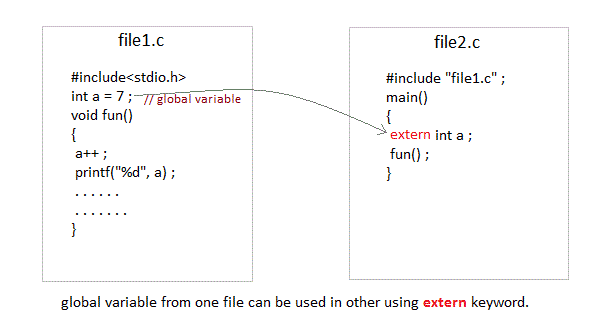
extern keywordThe extern keyword is used with a variable to inform the compiler that this variable is declared somewhere else. The extern declaration does not allocate storage for variables.
int main()
{
    a = 10;     //Error: cannot find definition of variable 'a'
    printf("%d", a);
}
int main()
{
    extern int x;   //informs the compiler that it is defined somewhere else
    x = 10;
    printf("%d", x);
}
int x;      //Global variable x
Scope: Local to the block in which the variable is defined
Default initial value: 0(Zero).
Lifetime: Till the whole program doesn’t finish its execution.
A static variable tells the compiler to persist/save the variable until the end of program. Instead of creating and destroying a variable every time when it comes into and goes out of scope, static variable is initialized only once and remains into existence till the end of the program. A static variable can either be internal or external depending upon the place of declaration. Scope of internal static variable remains inside the function in which it is defined. External static variables remain restricted to scope of file in which they are declared.
They are assigned 0 (zero) as default value by the compiler.
#include<stdio.h>

void test();    //Function declaration

int main()
{
    test();
    test();
    test();
}

void test()
{
    static int a = 0;       //a static variable
    a = a + 1;
    printf("%d\t",a);
}
Output: 1 2 3
Scope: Local to the function in which it is declared.
Default initial value: Any random value i.e garbage value
Lifetime: Till the end of function/method block, in which the variable is defined.
Register variables inform the compiler to store the variable in CPU register instead of memory. Register variables have faster accessibility than a normal variable. Generally, the frequently used variables are kept in registers. But only a few variables can be placed inside registers. One application of register storage class can be in using loops, where the variable gets used a number of times in the program, in a very short span of time.
NOTE: We can never get the address of such variables.
Syntax :
register int number;
Note: Even though we have declared the storage class of our variable number as register, we cannot surely say that the value of the variable would be stored in a register. This is because the number of registers in a CPU are limited. Also, CPU registers are meant to do a lot of important work. Thus, sometimes they may not be free. In such scenario, the variable works as if its storage class is auto.
To improve the speed of execution of the program and to carefully use the memory space occupied by the variables, following points should be kept in mind while using storage classes:
static storage class only when we want the value of the variable to remain same every time we call it using different function calls.register storage class only for those variables that are used in our program very oftenly. CPU registers are limited and thus should be used carefully.String is a sequence of characters that is treated as a single data item and terminated by null character '\0'. Remember that C language does not support strings as a data type. A string is actually one-dimensional array of characters in C language. These are often used to create meaningful and readable programs.
For example: The string “hello world” contains 12 characters including '\0' character which is automatically added by the compiler at the end of the string.
There are different ways to initialize a character array variable.
char name[13] = "Shweta";       // valid character array initialization

char name[10] = {'s','h','w','e','t','a','\0'};     // valid initialization
Remember that when you initialize a character array by listing all of its characters separately then you must supply the '\0' character explicitly.
Some examples of illegal initialization of character array are,
char ch[3] = "hell";    // Illegal

char str[4];
str = "hell";   // Illegal
Input function scanf() can be used with %s format specifier to read a string input from the terminal. But there is one problem with scanf()function, it terminates its input on the first white space it encounters. Therefore if you try to read an input string “Hello World” using scanf()function, it will only read Hello and terminate after encountering white spaces.
However, C supports a format specification known as the edit set conversion code %[..] that can be used to read a line containing a variety of characters, including white spaces.
#include<stdio.h>
#include<string.h>

void main()
{
    char str[20];
    printf("Enter a string");
    scanf("%[^\n]", &str);  //scanning the whole string, including the white spaces
    printf("%s", str);
}
Another method to read character string with white spaces from terminal is by using the gets() function.
char text[20];
gets(text);
printf("%s", text);
C language supports a large number of string handling functions that can be used to carry out many of the string manipulations. These functions are packaged in string.h library. Hence, you must include string.h header file in your programs to use these functions.
The following are the most commonly used string handling functions.
| Method | Description |
|---|---|
strcat() | It is used to concatenate(combine) two strings |
strlen() | It is used to show length of a string |
strrev() | It is used to show reverse of a string |
strcpy() | Copies one string into another |
strcmp() | It is used to compare two string |
strcat("hello", "world");
strcat() function will add the string “world” to “hello” i.e it will ouput helloworld.
strlen() function will return the length of the string passed to it.
int j;
j = strlen("shweta");
printf("%d",j);
Output: 6
strcmp() function will return the ASCII difference between first unmatching character of two strings.
int j;
j = strcmp("shweta", "vibhute");
printf("%d",j);
output: -1
It copies the second string argument to the first string argument.
#include<stdio.h>
#include<string.h>

int main()
{
    char s1[50];
    char s2[50];

    strcpy(s1, "Shweta");     //copies "studytonight" to string s1
    strcpy(s2, s1);     //copies string s1 to string s2

    printf("%s\n", s2);

    return(0);
}
Output: Shweta
It is used to reverse the given string expression.
#include<stdio.h>

int main()
{
    char s1[50];

    printf("Enter your string: ");
    gets(s1);
    printf("\nYour reverse string is: %s",strrev(s1));
    return(0);
}
Output: Enter your string: shweta Your reverse string is: atewhs
We already know, when we initialize a normal array (or you can say one dimensional array) during declaration, we need not to specify the size of it. However that’s not the case with 2D array, you must always specify the second dimension even if you are specifying elements during the declaration. Let’s understand this with the help of few examples –
/* Valid declaration*/ int abc[2][2] = {1, 2, 3 ,4 } /* Valid declaration*/ int abc[][2] = {1, 2, 3 ,4 } /* Invalid declaration – you must specify second dimension*/ int abc[][] = {1, 2, 3 ,4 } /* Invalid because of the same reason mentioned above*/ int abc[2][] = {1, 2, 3 ,4 }
We can calculate how many elements a two dimensional array can have by using this formula: The array arr[n1][n2] can have n1*n2 elements. The array that we have in the example below is having the dimensions 5 and 4. These dimensions are known as “subscripts”. So this array has first subscript value as 5 and second subscript value as 4. So the array abc[5][4] can have 5*4 = 20 elements. To store the elements entered by user we are using two for loops, one of them is a nested loop. The outer loop runs from 0 to the (first subscript -1) and the inner for loops runs from 0 to the (second subscript -1). This way the the order in which user enters the elements would be abc[0][0], abc[0][1], abc[0][2]…so on.
#include<stdio.h> int main() { /* 2D array declaration*/ int abc[5][4]; /*Counter variables for the loop*/ int i, j; for(i=0; i<5; i++) { for(j=0;j<4;j++) { printf(“Enter value for abc[%d][%d]:”, i, j); scanf(“%d”, &abc[i][j]); } } return 0; }
An array of arrays is known as 2D array. The two dimensional (2D) array in C programming is also known as matrix. A matrix can be represented as a table of rows and columns.
The below program demonstrates how to store the elements entered by user in a 2D array and how to display the elements of a 2D array.
#include<stdio.h>
int main(){
   /* 2D array declaration*/
   int disp[2][3];

   int i, j;
   for(i=0; i<2; i++) {
      for(j=0;j<3;j++) {
         printf("Enter value for disp[i][j]");
         scanf("%d", &disp[i][j]);
      }
   }
   //Displaying array elements
   printf("Two Dimensional array elements:\n");
   for(i=0; i<2; i++) {
      for(j=0;j<3;j++) {
         printf("%d ", disp[i][j]);
         if(j==2){
            printf("\n");
         }
      }
   }
   return 0;
}
Output:
Enter value for disp[0][0]:1
Enter value for disp[0][1]:2
Enter value for disp[0][2]:3
Enter value for disp[1][0]:4
Enter value for disp[1][1]:5
Enter value for disp[1][2]:6
Two Dimensional array elements:
1 2 3
4 5 6
There are two ways to initialize a two Dimensional arrays during declaration.
int disp[2][4] = {
    {10, 11, 12, 13},
    {14, 15, 16, 17}
};
OR
int disp[2][4] = { 10, 11, 12, 13, 14, 15, 16, 17};
An array is a group (or collection) of same data types. For example an int array holds the elements of int types.
Consider a scenario where we need to find out the average of 30 integer numbers entered by user. In C, we have two ways to do this: 1) Define 30 variables with int data type and then perform 30 scanf() operations to store the entered values in the variables and then at last calculate the average of them. 2) Have a single integer array to store all the values, loop the array to store all the entered values in array and later calculate the average.
I think the second solution is best , it is convenient to store same data types in one single variable and later access them using array index.
int num[10];  /* An integer array of 10                          elements */
char ch[10];  /* An array of characters for 10 elements */
Similarly an array can be of any data type such as double, float, short etc.
You can use array subscript (or index) to access any element stored in array. Subscript starts with 0, which means arr [0] represents the first element in the array arr.
#include<stdio.h>
int main()
{
    int avg = 0;
    int sum =0;
    int x=0;

    /* Array- declaration – length 4*/
    int num[4];

    /* We are using a for loop to traverse through the array*/
     /*For storing the entered values in the array
     */
    for (x=0; x<4;x++)
    {
        printf("Enter number %d \n", (x+1));
        scanf("%d", &num[x]);
    }
    for (x=0; x<4;x++)
    {
        sum = sum+num[x];
    }

    avg = sum/4;
    printf("Average of entered number is: %d", avg);
    return 0;
}
Output:
Enter number 1
10
Enter number 2
10
Enter number 3
20
Enter number 4
40
Average of entered number is: 20
In the above example, we have just declared the array and later we initialized it with the values input by user. You can also initialize the array during declaration like this:
int arr[5] = {1, 2, 3, 4 ,5};
OR
int arr[] = {1, 2, 3, 4, 5};
(Both are same)
Now we will see how goto statement is used?
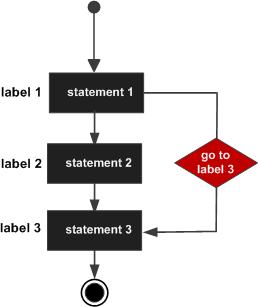
As the name indicates, goto statement is used to jump from one place of code to another. It is like linking a code to another. When the compiler sees the goto statement, then the corresponding ‘Label’ code will executed next.
Syntax of goto statement in C
goto label_name;
..
..
label_name: C-statements
#include<stdio.h>
int main()
{
   int sum=0;
   for(int i = 0; i<=10; i++)
{
 sum = sum+i;
 if(i==5){
    goto addition;
 }
   }

   addition:
   printf("%d", sum);

   return 0;
}
Output:
15
Explanation: In this example, we have a label addition and when the value of i (inside loop) is equal to 5 then we are jumping to this label using goto. This is reason the sum is displaying the sum of numbers till 5 even though the loop is set to run from 0 to 10.
Goto statement is not popular and not widely used.
Goto is mainly used for menu driven programs.
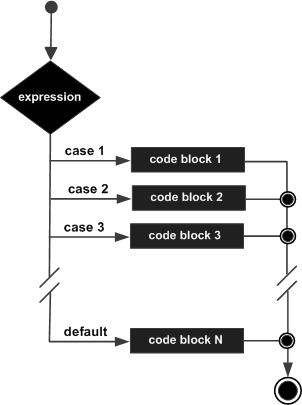
A switch statement tests the value of a variable and compares it with multiple cases. Once the case match is found, a block of statements associated with that particular case is executed.
Each case in a block of a switch has a different name/number which is referred to as an identifier. The value provided by the user is compared with all the cases inside the switch block until the match is found.
A general syntax of how switch-case is implemented in a ‘C’ program :
switch (variable or expression)
{
case constant:
     //C Statements      ;
case constant:
      //C Statements      ;      default:
      //C Statements      ;
 }
#include<stdio.h>
    int main() {
        int num =2;
        switch (num) {
            case 1:
                printf("Value is 1");
                break;
            case 2:
                printf("Value is 2");
                break;
            case 3:
                printf("Value is 3");
                break;
            default:
                printf("Out of range");
                break;
        }
        return 0;
    }
Output:
Value is 2
#include<stdio.h>
int main() {
int language =6;
  switch (language) {
  case 1:
    printf("C#\n");
    break;
  case 2:
    printf("C\n");
    break;
  case 3:
    printf("C++\n");
    break;
  default:
    printf("Other programming language\n");
      }
    }
Output:
Other programming language
The optional default case runs when no other matches are made.

 Shwetasvibhute