C – break statement

The break statement is used inside loops and switch case.

How the break statement is used?

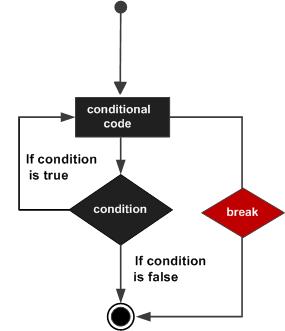
1. It is used to come out of the loop instantly. When a break statement is encountered inside a loop, the control directly comes out of loop and the loop gets terminated. It is used with if statement, whenever used inside loop.
2. This can also be used in switch case control structure. Whenever it is encountered in switch-case block, the control comes out of the switch-case

Syntax

The syntax for a break statement in C is as follows −

break;

Flow Diagram

c break statement

Example – Use of break in a while loop

#include <stdio.h>
int main()
{
     int num =0;
     while(num<=100)
     {
        printf("value of variable num is: %d\n", num);
        if (num==2)
        {
            break;
        }
        num++;
     }
     printf("Out of while-loop");
     return 0;
}

Output:

value of variable num is: 0
value of variable num is: 1
value of variable num is: 2
Out of while-loop

Example – Use of break in a for loop

#include <stdio.h>
int main()
{
      int var;
      for (var =100; var>=10; var --)
      {
           printf("var: %d\n", var);
           if (var==99)
           {
               break;
           }
      }
     printf("Out of for-loop");
     return 0;
}

Output:

var: 100
var: 99
Out of for-loop

Example – Use of break statement in switch-case

#include <stdio.h>
int main()
{
      int num;
      printf("Enter value of num:");
      scanf("%d",&num);
      switch (num)
      {
          case 1:
             printf("You have entered value 1\n");
             break;
          case 2:
             printf("You have entered value 2\n");
             break;
          case 3:
             printf("You have entered value 3\n");
             break;
          default:
             printf("Input value is other than 1,2 & 3 ");
     }
     return 0;
}

Output:

Enter value of num:2
You have entered value 2

You would always want to use break statement in a switch case block, otherwise once a case block is executed, the rest of the subsequent case blocks will execute. For example, if we don’t use the break statement after every case block then the output of this program would be:

Enter value of num:2
You have entered value 2
You have entered value 3
Input value is other than 1,2 & 3

C – continue statement

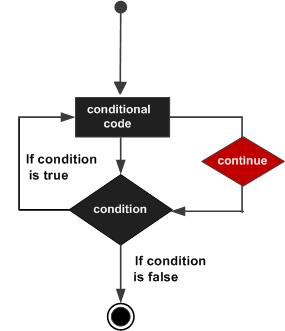
The continue statement is used inside  loops.When a continue statement is encountered inside a loop, control jumps to the beginning of the loop for next iteration, skipping the execution of statements inside the body of loop for the current iteration.

Syntax:

continue;

Flow Diagram

C continue statement

Example: continue statement inside for loop

#include <stdio.h>
int main()
{
   for (int j=0; j<=8; j++)
   {
      if (j==4)
      {
     /* The continue statement is encountered when the value of j is equal to 4.*/
     continue;
       }

       /* This print statement would not execute for the loop iteration where    j==4  because in that case this statement would be skipped. */
       printf("%d ", j);
   }
   return 0;
}

Output:

0 1 2 3 5 6 7 8

Value 4 is missing in the output, why? When the value of variable j is 4, the program encountered a continue statement, which makes the control to jump at the beginning of the for loop for next iteration, skipping the statements for current iteration (that’s the reason printf didn’t execute when j is equal to 4).

Example: Use of continue in While loop

In this example we are using continue inside while loop. When using while or do-while loop you need to place an increment or decrement statement just above the continue so that the counter value is changed for the next iteration. For example, if we do not place counter– statement in the body of “if” then the value of counter would remain 7 indefinitely.

#include <stdio.h>
int main()
{
    int counter=10;
    while (counter >=0)
    {
	 if (counter==7)
	 {
	      counter--;
	      continue;
	 }
	 printf("%d  ", counter);
	 counter--;
    }
    return 0;
}

Output:

10 9 8 6 5 4 3 2 1 0

The print statement is skipped when counter value was 7.

Another Example of continue in do-While loop

#include <stdio.h>
int main()
{
   int j=0;
   do
   {
      if (j==7)
      {
         j++;
         continue;
      }
      printf("%d ", j);
      j++;
   }while(j<10);
   return 0;
}

Output:

0 1 2 3 4 5 6 8 9

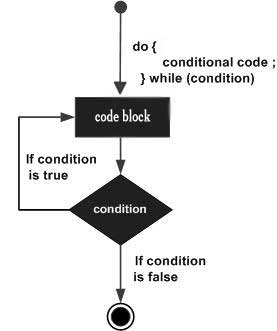
do while loop in C

A do while loop is similar to while loop with one exception that it executes the statements inside the body of do-while before checking the condition. On the other hand in the while loop, first the condition is checked and then the statements in while loop are executed. So you can say that if a condition is false at the first place then the do while would run once, however the while loop would not run at all.

Syntax of do-while loop

do
{
    //Statements 

}while(condition test);

Flow Diagram

do...while loop in C

Example of do while loop

#include <stdio.h>
int main()
{
	int j=0;
	do
	{
		printf("Value of variable j is: %d\n", j);
		j++;
	}while (j<=3);
	return 0;
}

Output

Value of variable j is: 0
Value of variable j is: 1
Value of variable j is: 2
Value of variable j is: 3

While vs do..while loop in C

Using while loop:

#include <stdio.h>
int main()
{
    int i=0;
    while(i==1)
    {
	printf("while vs do-while");
    }
    printf("Out of loop");
}

Output:

Out of loop

Same example using do-while loop

#include <stdio.h>
int main()
{
   int i=0;
   do
   {
	printf("while vs do-while\n");
   }while(i==1);
   printf("Out of loop");
}

Output:

while vs do-while
Out of loop

Explanation: As mentioned in the beginning that do-while runs at least once even if the condition is false because the condition is evaluated, after the execution of the body of loop.

C – while loop

Now we will learn while loop in C.

Syntax of while loop:

while (condition test)
{
      //Statements to be executed repeatedly 
      // Increment (++) or Decrement (--) Operation
}
Example of while loop
#include <stdio.h> 
int main() 
{    
int count=1;    
while (count <= 4)    
{ 
printf("%d ", count);
 count++;   
 }    
return 0; 
}
 Output
 1 2 3 4

step1: The variable count is initialized with value 1 and then it has been tested for the condition.
step2: If the condition returns true then the statements inside the body of while loop are executed else control comes out of the loop.
step3: The value of count is incremented using ++ operator then it has been tested again for the loop condition.

Guess the output of this while loop

#include <stdio.h>
int main()
{
     int var=1;
     while (var <=2)
     {
        printf("%d ", var);
     }
}

The program is an example of infinite while loop. Since the value of the variable var is same (there is no ++ or – operator used on this variable, inside the body of loop) the condition var<=2 will be true forever and the loop would never terminate.

Examples of infinite while loop

Example 1:

#include <stdio.h>
int main()
{
     int var = 6;
     while (var >=5)
     {
        printf("%d", var);
        var++;
     }
   return 0;
}

Infinite loop: var will always have value >=5 so the loop would never end.

Example 2:

#include <stdio.h>
int main()
{
    int var =5;
    while (var <=10)
    {
       printf("%d", var);
       var--;
    }
    return 0;
}

Infinite loop: var value will keep decreasing because of –- operator, hence it will always be <= 10.

Use of Logical operators in while loop

Just like relational operators (<, >, >=, <=, ! =, ==), we can also use logical operators in while loop. The following scenarios are valid :

while(num1<=10 && num2<=10)

-using AND(&&) operator, which means both the conditions should be true.

while(num1<=10||num2<=10)

– OR(||) operator, this loop will run until both conditions return false.

while(num1!=num2 &&num1 <=num2)

– Here we are using two logical operators NOT (!) and AND(&&).

while(num1!=10 ||num2>=num1)

Example of while loop using logical operator

In this example we are testing multiple conditions using logical operator inside while loop.

#include <stdio.h>
int main()
{
   int i=1, j=1;
   while (i <= 4 || j <= 3)
   {
	printf("%d %d\n",i, j);
	i++;
	j++;
   }
   return 0;
}

Output:

1 1
2 2
3 3
4 4

Looping statements: for loop

A loop is used for executing a block of statements repeatedly until a given condition returns false.

C For loop

This is one of the most frequently used loop in C
Syntax of for loop:

for (initialization; condition test; increment or decrement)
{
       //Statements to be executed repeatedly
}
Step 1: First initialization happens and  variable gets initialized.

Step 2: In the second step the condition is checked, where the variable is tested for the given condition, if the condition returns true then the C statements inside the body of for loop gets executed, if the condition returns false then the for loop gets terminated and the control comes out of the loop.

Step 3: After successful execution of statements inside the body of loop, the counter variable is incremented or decremented, depending on the operation (++ or --).

Example of For loop

#include <stdio.h>
int main()
{
   int i;
   for (i=1; i<=3; i++)
   {
       printf("%d\n", i);
   }
   return 0;
}

Output:

1
2
3

Various forms of for loop in C

Let’s use variable num as the counter in all the following examples –
1) Here instead of num++, we can write num=num+1 which is same as num++.

for (num=10; num<20; num=num+1)

2) Initialization part can be skipped from loop as shown below, the variable is declared before the loop.

int num=10;
for (;num<20;num++)

Note: Even though we can skip initialization part but semicolon (;) before condition is must, without which you will get compilation error.
3) Like initialization, you can also skip the increment part as we did below. In this case semicolon (;) is must after condition logic. In this case the increment or decrement part is done inside the loop.

for (num=10; num<20; )
{
      //Statements
      num++;
}

4) This is also possible. The variable is initialized before the loop and incremented inside the loop.

int num=10;
for (;num<20;)
{
      //Statements
      num++;
}

5) As mentioned above, the variable can be decremented as well. In the below example the variable gets decremented each time the loop runs until the condition num>10 returns false.

for(num=20; num>10; num--)

Nested For Loop in C

Nesting of loop is also possible. Let’s take an example to understand this:

#include <stdio.h>
int main()
{
   for (int i=0; i<2; i++)
   {
	for (int j=0; j<4; j++)
	{
	   printf("%d, %d\n",i ,j);
	}
   }
   return 0;
}

Output:

0, 0
0, 1
0, 2
0, 3
1, 0
1, 1
1, 2
1, 3

In the above example we have a for loop inside another for loop, this is called nesting of loops. One of the example where we use nested for loop is Two Dimensional Array

Multiple initialization inside for Loop in C

We can have multiple initialization in the for loop as shown below.

for (i=1,j=1;i<10 && j<10; i++, j++)

What’s the difference between above for loop and a simple for loop?
1. It is initializing two variables. Note: both are separated by comma (,).
2. It has two test conditions joined together using AND (&&) logical operator. Note: You cannot use multiple test conditions separated by comma, you must use logical operator such as && or || to join conditions.
3. It has two variables in increment part.  Note:Should be separated by comma.

Example of for loop with multiple test conditions

#include <stdio.h>
int main()
{
   int i,j;
   for (i=1,j=1 ; i<3 || j<5; i++,j++)
   {
	printf("%d, %d\n",i ,j);
   }
   return 0;
}

Decision making statements

If statement:

When we need to execute a block of statements only when a given condition is true then we use if statement. 

Syntax of if statement:
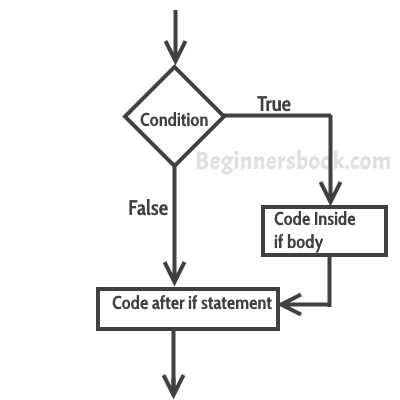
The statements inside the body of “if” only execute if the given condition returns true. If the condition returns false then the statements inside “if” are skipped.

if (condition)
{
     //Block of C statements here
     //These statements will only execute if the condition is true
}

Flow Diagram of if statement

C-if-statement

Example of if statement

#include <stdio.h>
int main()
{
    int x = 20;
    int y = 22;
    if (x<y)
    {
    printf("Variable x is less than y");
    }
    return 0;
}

Output:

Variable x is less than y

Explanation: The condition (x<y) specified in the “if” returns true for the value of x and y, so the statement inside the body of if is executed.

Example of multiple if statements

We can use multiple if statements to check more than one conditions.

#include <stdio.h>
int main()
{
    int x, y;
    printf("enter the value of x:");
    scanf("%d", &x);
    printf("enter the value of y:");
    scanf("%d", &y);
    if (x>y)
    {
	printf("x is greater than y\n");
    }
    if (x<y)
    {
	printf("x is less than y\n");
    }
    if (x==y)
    {
	printf("x is equal to y\n");
    }
    printf("End of Program");
    return 0;
}

In the above example the output depends on the user input.

Output:

enter the value of x:20
enter the value of y:20
x is equal to y

C If else statement

Syntax of if else statement:
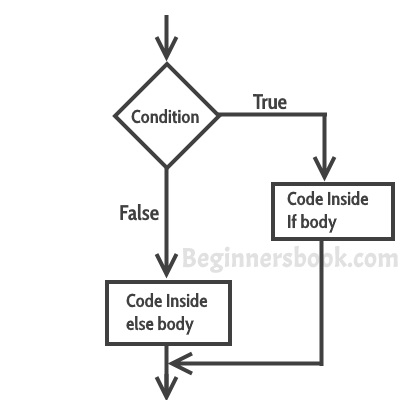
If condition returns true then the statements inside the body of “if” are executed and the statements inside body of “else” are skipped.
If condition returns false then the statements inside the body of “if” are skipped and the statements in “else” are executed.

if(condition) {
   // Statements inside body of if
}
else {
   //Statements inside body of else
}

Flow diagram of if else statement

C If else flow diagram

Example of if else statement

In this program user is asked to enter the age and based on the input, the if..else statement checks whether the entered age is greater than or equal to 18. If this condition meet then display message “You are eligible for voting”, however if the condition doesn’t meet then display a different message “You are not eligible for voting”.

#include <stdio.h>
int main()
{
   int age;
   printf("Enter your age:");
   scanf("%d",&age);
   if(age >=18)
   {
	/* This statement will only execute if the
	 * above condition (age>=18) returns true
	 */
	printf("You are eligible for voting");
   }
   else
   {
	/* This statement will only execute if the
	 * condition specified in the "if" returns false.
	 */
	printf("You are not eligible for voting");
   }
   return 0;
}

Output:

Enter your age:14
You are not eligible for voting

Note: If there is only one statement is present in the “if” or “else” body then you do not need to use the braces (parenthesis). For example the above program can be rewritten like this:

#include <stdio.h>
int main()
{
   int age;
   printf("Enter your age:");
   scanf("%d",&age);
   if(age >=18)
	printf("You are eligible for voting");
   else
	printf("You are not eligible for voting");
   return 0;
}

C Nested If..else statement

When an if else statement is present inside the body of another “if” or “else” then this is called nested if else.
Syntax of Nested if else statement:

if(condition) {
    //Nested if else inside the body of "if"
    if(condition2) {
       //Statements inside the body of nested "if"
    }
    else {
       //Statements inside the body of nested "else"
    }
}
else {
    //Statements inside the body of "else"
}

Example of nested if..else

#include <stdio.h>
int main()
{
   int var1, var2;
   printf("Input the value of var1:");
   scanf("%d", &var1);
   printf("Input the value of var2:");
   scanf("%d",&var2);
   if (var1 != var2)
   {
	printf("var1 is not equal to var2\n");
	//Nested if else
	if (var1 > var2)
	{
		printf("var1 is greater than var2\n");
	}
	else
	{
		printf("var2 is greater than var1\n");
	}
   }
   else
   {
	printf("var1 is equal to var2\n");
   }
   return 0;
}

Output:

Input the value of var1:12
Input the value of var2:21
var1 is not equal to var2
var2 is greater than var1

C – else..if statement

The else..if statement is useful when you need to check multiple conditions within the program, nesting of if-else blocks can be avoided using else..if statement.

Syntax of else..if statement:

if (condition1) 
{
   //These statements would execute if the condition1 is true
}
else if(condition2) 
{
   //These statements would execute if the condition2 is true
}
else if (condition3) 
{
   //These statements would execute if the condition3 is true
}
.
.
else 
{
   //These statements would execute if all the conditions return false.
}

Example of else..if statement

Lets take the same example that we have seen above while discussing nested if..else. We will rewrite the same program using else..if statements.

#include <stdio.h>
int main()
{
   int var1, var2;
   printf("Input the value of var1:");
   scanf("%d", &var1);
   printf("Input the value of var2:");
   scanf("%d",&var2);
   if (var1 !=var2)
   {
	printf("var1 is not equal to var2\n");
   }
   else if (var1 > var2)
   {
	printf("var1 is greater than var2\n");
   }
   else if (var2 > var1)
   {
	printf("var2 is greater than var1\n");
   }
   else
   {
	printf("var1 is equal to var2\n");
   }
   return 0;
}

Output:

Input the value of var1:12
Input the value of var2:21
var1 is not equal to var2

As you can see that only the statements inside the body of “if” are executed. This is because in this statement as soon as a condition is satisfied, the statements inside that block are executed and rest of the blocks are ignored.

Important Points:
1. else and else..if are optional statements, a program having only “if” statement would run fine.
2. else and else..if cannot be used without the “if”.
3. There can be any number of else..if statement in a if else..if block.
4. If none of the conditions are met then the statements in else block gets executed.
5. Just like relational operators, we can also use logical operators such as AND (&&), OR(||) and NOT(!).
Operators in C Language

C language supports a rich set of built-in operators. An operator is a symbol that tells the compiler to perform a certain mathematical or logical manipulation. Operators are used in programs to manipulate data and variables.

C operators can be classified into following types:

  • Arithmetic operators
  • Relational operators
  • Logical operators
  • Bitwise operators
  • Assignment operators
  • Conditional operators
  • Special operators

Arithmetic operators

C supports all the basic arithmetic operators. The following table shows all the basic arithmetic operators.

Operator Description
+adds two operands
subtract second operand
from first
*multiply two operand
/divide numerator by
denominator
%remainder of division
++Increment operator –
increases integer value
by one
Decrement operator –
decreases integer value by one

Relational operators

The following table shows all relation operators supported by C.

Operator Description
==Check if two
operand are
equal
!=Check if two
operand are
not equal.
>Check if operand
on
left is greater than
operand on right
<Check operand on the left
is smaller than
right operand
>=check left operand is greater
than or equal to
right operand
<=Check if operand
on left is smaller
than or equal to
right operand

Logical operators

C language supports following 3 logical operators. Suppose a = 1 and b = 0,

Operator Description Example
&&Logical AND(a && b) is
false
||Logical OR(a || b) is
true
!Logical NOT(!a) is false

Bitwise operators

Bitwise operators perform manipulations of data at bit level. These operators also perform shifting of bits from right to left. Bitwise operators are not applied to floator double(These are datatypes, we will learn about them in the next tutorial).

OperatorDescription
&Bitwise AND
|Bitwise OR
^Bitwise exclusive OR
<<left shift
>>right shift

Now lets see truth table for bitwise &| and ^

aba & ba | ba ^ b
00000
01011
10011
11110

The bitwise shift operator, shifts the bit value. The left operand specifies the value to be shifted and the right operand specifies the number of positions that the bits in the value have to be shifted. Both operands have the same precedence. 


Assignment Operators

Assignment operators supported by C language are as follows.

Operator DescriptionEx
=assigns values from
right side operands
to left side operand
a=b
+=adds right operand
to the left operand
and assign the result to left
a+=b is same as a=a+b
-=subtracts right
operand from left operand and assign
result to left operand
a-=b
is
same as
a=a-b
*=mutiply left operand with right operand and assign result to left operanda*=b is same as a=a*b
/=divides left operand with the right operand and assign the result to left operanda/=b is same as a=a/b
%=calculate modulus
using two operands
and assign the result to left operand

a%=b is
same as a=a%b

Conditional operator

The conditional operators in C language are known by two more names

  1. Ternary Operator
  2. ? : Operator

It is actually the if condition that we use in C language decision making, but using conditional operator, we turn the if condition statement into a short and simple operator.

The syntax of a conditional operator is :

expression 1 ? expression 2: expression 3

Explanation:

  • The question mark “?” in the syntax represents the if part.
  • The first expression (expression 1) generally returns either true or false, based on which it is decided whether (expression 2) will be executed or (expression 3)
  • If (expression 1) returns true then the expression on the left side of ” : “ i.e (expression 2) is executed.
  • If (expression 1) returns false then the expression on the right side of ” : “ i.e (expression 3) is executed.

Special operator

Operator DescriptionExample
sizeofReturns
size of a
variable
sizeof(x) 
return size of
variable x
&Returns address
of
variable
&x ; return
address of
variable x
*Pointer
to a
variable
*x ; will be
pointer to a variable x

What are Keywords in C?

Keywords are preserved words that have special meaning in C language. The meaning of C language keywords has already been described to the C compiler. These meaning cannot be changed. Thus, keywords cannot be used as variable names because that would try to change the existing meaning of the keyword, which is not allowed.(Don’t worry if you do not know what variables are, you will soon understand.) There are total 32 keywords in C language.

autodoubleintstruct
breakelselongswitch
caseenumregistertypedef
constexternreturnunion
charfloatshortunsigned
continueforsignedvolatile
defaultgotosizeofvoid
doifstaticwhile

What are Identifiers?

In C language identifiers are the names given to variables, constants, functions and user-define data. These identifier are defined against a set of rules.


Rules for an Identifier

  1. An Identifier can only have alphanumeric characters(a-z , A-Z , 0-9) and underscore(_).
  2. The first character of an identifier can only contain alphabet(a-z , A-Z) or underscore (_).
  3. Identifiers are also case sensitive in C. For example name and Name are two different identifiers in C.
  4. Keywords are not allowed to be used as Identifiers.
  5. No special characters, such as semicolon, period, whitespaces, slash or comma are permitted to be used in or as Identifier.

When we declare a variable or any function in C language program, to use it we must provide a name to it, which identified it throughout the program, for example:

int myvariable = "Study";

Here myvariable is the name or identifier for the variable which stores the value “Study” in it.


Character set

In C language characters are grouped into the following catagories,

  1. Letters(all alphabets a to z & A to Z).
  2. Digits (all digits 0 to 9).
  3. Special characters, ( such as colon :, semicolon ;, period ., underscore _, ampersand & etc).
  4. White spaces.

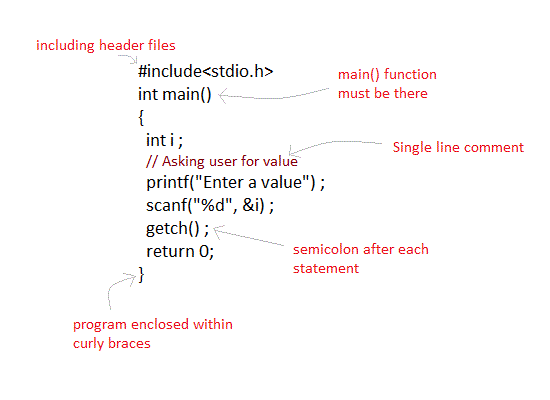
C Language Basic Syntax Rules

C language syntax specify rules for sequence of characters to be written in C language. In simple language it states how to form statements in a C language program – How should the line of code start, how it should end, where to use double quotes, where to use curly brackets etc.

The rule specify how the character sequence will be grouped together, to form tokens. A smallest individual unit in C program is known as C Token. Tokens are either keywords, identifiers, constants, variables or any symbol which has some meaning in C language. A C program can also be called as a collection of various tokens.

In the following program,

#include 
int main()
{
    printf("Hello,World");
    return 0;
}

if we take any one statement:

printf("Hello,World");

Then the tokens in this statement are→ printf("Hello,World") and ;.

So C tokens are basically the building blocks of a C program.


Semicolon ;

Semicolon ; is used to mark the end of a statement and beginning of another statement. Absence of semicolon at the end of any statement, will mislead the compiler to think that this statement is not yet finished and it will add the next consecutive statement after it, which may lead to compilation(syntax) error.

#include 
int main()
{
    printf("Hello,World")
    return 0;
}

In the above program, we have omitted the semicolon from the printf("...") statement, hence the compiler will think that starting from printf uptill the semicolon after return 0 statement, is a single statement and this will lead to compilation error.


Comments

Comments are plain simple text in a C program that are not compiled by the compiler. We write comments for better understanding of the program. Though writing comments is not compulsory, but it is recommended to make your program more descriptive. It make the code more readable.

There are two ways in which we can write comments.

  1. Using // This is used to write a single line comment.
  2. Using /* */: The statements enclosed within /*and */ , are used to write multi-line comments.

Example of comments :

// This is a comment

/* This is a comment */

/* This is a long 
and valid comment */

// this is not
  a valid comment

Some basic syntax rule for C program

  • C is a case sensitive language so all C instructions must be written in lower case letter.
  • All C statement must end with a semicolon.
  • Whitespace is used in C to describe blanks and tabs.
  • Whitespace is required between keywords and identifiers. We will learn about keywords and identifiers in the next tutorial.
C language syntax rules

C input and output

Now we will see what are C input and output functions and use of it :

Input means to provide the program with some data to be used in the program and Output means to display data on screen or write the data to a printer or a file.

C programming language provides many built-in functions to read any given input and to display data on screen when there is a need to output the result.

In this article, we will learn about such functions, which can be used in our program to take input from user and to output the result on screen.

All these built-in functions are present in C header files, we will also specify the name of header files in which a particular function is defined while discussing about it.


scanf() and printf() functions

The standard input-output header file, named stdio.hcontains the definition of the functions printf() and scanf(), which are used to display output on screen and to take input from user respectively.

#include<stdio.h>

void main()
{
    // defining a variable
    int i;
    /* 
        displaying message on the screen
        asking the user to input a value
    */
    printf("Please enter a value...");
    /*
        reading the value entered by the user
    */
    scanf("%d", &i);
    /*
        displaying the number as output
    */
    printf( "\nYou entered: %d", i);
}

When you will compile the above code, it will ask you to enter a value. When you will enter the value, it will display the value you have entered on screen.

You must be wondering what is the purpose of %d inside the scanf() or printf() functions. It is known as format string and this informs the scanf() function, what type of input to expect and in printf() it is used to give a heads up to the compiler, what type of output to expect.

Format string Meaning
%dScan or print an integer as signed decimal number
%fScan or print a floating point number
%cTo scan or print a character
%sTo scan or print a character string. The scanning ends at whitespace.

We can also limit the number of digits or characters that can be input or output, by adding a number with the format string specifier, like "%1d" or "%3s", the first one means a single numeric digit and the second one means 3 characters, hence if you try to input 42, while scanf() has "%1d", it will take only 4 as input. Same is the case for output.

NOTE : printf() function returns the number of characters printed by it, and scanf() returns the number of characters read by it.

int i = printf("hello");

In this program printf("hello"); will return  5 as result, which will be stored in the variable i, because hello has 5 characters.


getchar() & putchar()functions

The getchar() function reads a character from the terminal and returns it as an integer. This function reads only single character at a time. You can use this method in a loop in case you want to read more than one character. The putchar() function displays the character passed to it on the screen and returns the same character. This function too displays only a single character at a time. In case you want to display more than one characters, use putchar() method in a loop.

#include <stdio.h>

void main( )
{
    int c;
    printf("Enter a character");
    /*
        Take a character as input and 
        store it in variable c
    */
    c = getchar();
    /*
        display the character stored 
        in variable c 
    */
    putchar(c);
}

When you will compile the above code, it will ask you to enter a value. When you will enter the value, it will display the value you have entered.


gets() & puts() functions

The gets() function reads a line from stdin(standard input) into the buffer pointed to by str pointer, until either a terminating newline or EOF (end of file) occurs. The puts() function writes the string str and a trailing newline to stdout.

str → This is the pointer to an array of chars where the C string is stored. (Ignore if you are not able to understand this now.)

#include<stdio.h>

void main()
{
    /* character array of length 100 */
    char str[100];
    printf("Enter a string");
    gets( str );
    puts( str );
    getch();
}

When you will compile the above code, it will ask you to enter a string. When you will enter the string, it will display the value you have entered.


Difference between scanf() and gets()

The main difference between these two functions is that scanf() stops reading characters when it encounters a space, but gets() reads space as character too.

If you enter name as Study well using scanf() it will only read and store Study and will leave the part after space. But gets() function will read it completely.

Design a site like this with WordPress.com
Get started